2023-10-29
All about Large Language Models (LLMs)
Large Language Models or LLMs are the focus of attention for AI. They are driving both the application space as well as research space.
Here is a link covering the latest in the evolution of LLMs
https://lifearchitect.ai/models/
A pragmatic guide to LLMs can be found here
https://github.com/Mooler0410/LLMsPracticalGuide
Hacker's Guide to LLMs (video - 90min)
https://www.youtube.com/watch?v=jkrNMKz9pWU

2023-10-23
Python 3.12
Bright new shiny python available 3.12
https://docs.python.org/3/whatsnew/3.12.html
This is more than a skin-deep repolished gem
https://docs.python.org/3/whatsnew/3.12.html#whatsnew312-pep684
And
https://realpython.com/python312-new-features/#one-gil-per-subinterpreter
Fresh look
Decided to change the theme to a new fresh look. Light background with some colour highlights.

2023-09-10
2023-09-06
Revamp of Blog
This is a new restart of the blog. Hope to see more visitors.
Change is an opportunity
💓
2018-12-28
2016-03-14
R errors during startup on Mac OS X El Capitan
During startup - Warning messages:
1: Setting LC_CTYPE failed, using "C"
2: Setting LC_COLLATE failed, using "C"
3: Setting LC_TIME failed, using "C"
4: Setting LC_MESSAGES failed, using "C"
5: Setting LC_PAPER failed, using "C"
[R.app GUI 1.50 (6126) x86_64-apple-darwin9.8.0]
1: Setting LC_CTYPE failed, using "C"
2: Setting LC_COLLATE failed, using "C"
3: Setting LC_TIME failed, using "C"
4: Setting LC_MESSAGES failed, using "C"
5: Setting LC_PAPER failed, using "C"
[R.app GUI 1.50 (6126) x86_64-apple-darwin9.8.0]
WARNING: You're using a non-UTF8 locale, therefore only ASCII characters will work. Please read R for Mac OS X FAQ (see Help) section 9 and adjust your system preferences accordingly.
----- solution that worked for me is to ----------
- Open Terminal
- Write or paste in:
defaults write org.R-project.R force.LANG en_US.UTF-8 - Close Terminal
- Start R
2015-10-21
Java EE Application Servers
Glassfish is the Java EE from Sun (now Oracle). https://glassfish.java.net/
It was taken to be the reference version for Java EE server implementations. However, Oracle triggered a mass migration to other Java EE servers when it announced that it would no longer provide commercial support for the Java EE 7 version of Glassfish (i.e. the 4.X family).
See: http://www.zdnet.com/article/oracle-abandons-commercial-support-for-glassfish-jee-server/
However, Payara (a third party) came along to offer commercial support for the GlassFish server. They have their own maintained version of GlassFish which they provide commercial support for. http://www.payara.co.uk/downloads
According to Payara's website (http://www.payara.co.uk/about):
Another alternative Java EE 7.0 server to Glassfish is Wildfly (by Redhat).
http://wildfly.org/
Wildfly 9.X is the current stable release. In order to use it with Eclipse EE, you need to go the menu option "Help > Eclipse Marketplace". Enter "jboss" in the search field. Install the "JBoss Tools 4.X.X" for eclipse. This will add an additional server adaptor for Wildfly 8.x, 9.x and 10.x.
One advantage of Wildfly is that a cloud service version is available for deployment at OpenShift (by Redhat). https://www.openshift.com/
Registration is free.
Another popular alternative is TomEE (pronounced 'Tommy'). This is not yet a full Java EE 7.0 server. It is Java EE 6.0 web profile. http://tomee.apache.org/apache-tomee.html
For TomEE, the server adaptors are already bundled with Eclipse EE, so no further downloads are needed. However, the convenience of Java EE 7.0 probably outweighs the time taken to download/network install the server adaptor. Maybe, it is a good idea to waif for the Java EE 7.0 version of TomEE which would be out with the TomEE 2.X series.
One last Java EE server I wish to mention is the Resin Server (it is known to be blazing fast), http://caucho.com/
This is not a full Java EE 7.0 server. It support only Java EE 6.0 web profile.
Wikipedia contains a good comparison table for all the different applicaiton servers.
https://en.wikipedia.org/wiki/Comparison_of_application_servers
It was taken to be the reference version for Java EE server implementations. However, Oracle triggered a mass migration to other Java EE servers when it announced that it would no longer provide commercial support for the Java EE 7 version of Glassfish (i.e. the 4.X family).
See: http://www.zdnet.com/article/oracle-abandons-commercial-support-for-glassfish-jee-server/
However, Payara (a third party) came along to offer commercial support for the GlassFish server. They have their own maintained version of GlassFish which they provide commercial support for. http://www.payara.co.uk/downloads
According to Payara's website (http://www.payara.co.uk/about):
Payara is 24/7 software support for GlassFish Server Open Source Edition.For developers who want to use GlassFish or Payara using the Eclipse EE IDE (Mars or Juno), they need to go to the menu option "Help > Eclipse Marketplace". Enter "Glassfish" into the search field. Install the "Glassfish Tools" for eclipse. This will add an additional server adaptor for the Glassfish (in addtion to the standard ones for apache tomcat, basic, and objectweb).
We take GlassFish upstream. We support it, fix it, enhance it. We release it as open source Payara Server - a Supported version of GlassFish - a Java EE 7 Application Server.
Payara Server is a drop in replacement for GlassFish Application Server, with the peace of mind of quarterly releases containing enhancements, bug fixes and patches to upstream GlassFish and dependent libraries (Tyrus, Eclipse Link, Jersey and others).
Another alternative Java EE 7.0 server to Glassfish is Wildfly (by Redhat).
http://wildfly.org/
Wildfly 9.X is the current stable release. In order to use it with Eclipse EE, you need to go the menu option "Help > Eclipse Marketplace". Enter "jboss" in the search field. Install the "JBoss Tools 4.X.X" for eclipse. This will add an additional server adaptor for Wildfly 8.x, 9.x and 10.x.
One advantage of Wildfly is that a cloud service version is available for deployment at OpenShift (by Redhat). https://www.openshift.com/
Registration is free.
Another popular alternative is TomEE (pronounced 'Tommy'). This is not yet a full Java EE 7.0 server. It is Java EE 6.0 web profile. http://tomee.apache.org/apache-tomee.html
For TomEE, the server adaptors are already bundled with Eclipse EE, so no further downloads are needed. However, the convenience of Java EE 7.0 probably outweighs the time taken to download/network install the server adaptor. Maybe, it is a good idea to waif for the Java EE 7.0 version of TomEE which would be out with the TomEE 2.X series.
One last Java EE server I wish to mention is the Resin Server (it is known to be blazing fast), http://caucho.com/
This is not a full Java EE 7.0 server. It support only Java EE 6.0 web profile.
Wikipedia contains a good comparison table for all the different applicaiton servers.
https://en.wikipedia.org/wiki/Comparison_of_application_servers
2015-06-16
Installing Oracle JDK 8 on Ubuntu Linux
Recently I installed Ubuntu Linux 15 64-bit on my laptop.
I then realized that the Oracle JDK 8 does not come as part of the standard distribution. A quick google search led me to the instructions below which I managed to follow without any problems.
http://tecadmin.net/install-oracle-java-8-jdk-8-ubuntu-via-ppa/
or
http://www.webupd8.org/2012/09/install-oracle-java-8-in-ubuntu-via-ppa.html
Here are all the commands (that you can cut and paste)
sudo add-apt-repository ppa:webupd8team/java
sudo apt-get update
sudo apt-get install oracle-java8-installer
sudo apt-get install oracle-java8-set-default
I then realized that the Oracle JDK 8 does not come as part of the standard distribution. A quick google search led me to the instructions below which I managed to follow without any problems.
http://tecadmin.net/install-oracle-java-8-jdk-8-ubuntu-via-ppa/
or
http://www.webupd8.org/2012/09/install-oracle-java-8-in-ubuntu-via-ppa.html
Here are all the commands (that you can cut and paste)
sudo add-apt-repository ppa:webupd8team/java
sudo apt-get update
sudo apt-get install oracle-java8-installer
sudo apt-get install oracle-java8-set-default
2015-03-25
Free IDE for Python coding -- Netbeans 8.0.2 plugin for Python IDE
Python in NetBeans IDE 8.0.2
Read the instructions in the link above.
Download the plugin package zip file from
Once you've downloaded the plugin and unzipped to a directory of choice:Open NetBeans.
- In the top menu bar, click "Tools" -> "Plugins".
- Click the "Downloaded" tab.
- Click the "Add Plugins..." button.
- Browse to the folder you unzipped the Python plugin files to.
- Highlight all of the "org-netbeans-modules-python*.nbm" files.
- Click "Open", which will return you to the "Downloaded" tab within the "Plugins" window.
- Click "Install".
- Restart your browser.
- And.. You're good to go
2014-11-06
2014-08-29
Mystery of why Boot2Docker did not work on Windows 8.1 64-bit (or Intel VT-x Virtualization errors)
I had changed to ultra notebook running Intel i7 (i7-4600U). It should support Intel VT-x. I had made sure that the BIOS setting had the Intel Virtualization was enabled. I installed Boot2Docker, which also installs Git and VirtualBox for Windows.
Everything went smoothly initially, but when I clicked on the Boot2Docker Start icon, things started to go wrong. The VirtualBox complained of an Intel VT-x error. At first, I thought there must be something wrong with the VirtualBox software. So I uninstalled the version of VirtualBox that came with Boot2Docker and tried reinstalling an older version of the VirtualBox which I had used before.
No luck, ... it still has the Intel VT-x not supported on my CPU error.
This really drove me nuts because it was a new laptop, and I could not believe that i7 does not support Intel VT-x hardware assisted virtualization. So I checked the Intel website for the the chip specs (i7-4600U) and sure enough it says it supports VT-x.
However, this was not what I was experiencing with the VirtualBox. I downloaded the Intel Processor Identification Utility from their website just to have a way to double check the VT-x support. Sure enough, the Intel utility also reported that VT-x was off (but it had a note that said I should check the BIOS -- which I had already done earlier).
Finally, I was ready to give up.
Then I chanced upon something that caught my eye.
Everything went smoothly initially, but when I clicked on the Boot2Docker Start icon, things started to go wrong. The VirtualBox complained of an Intel VT-x error. At first, I thought there must be something wrong with the VirtualBox software. So I uninstalled the version of VirtualBox that came with Boot2Docker and tried reinstalling an older version of the VirtualBox which I had used before.
No luck, ... it still has the Intel VT-x not supported on my CPU error.
This really drove me nuts because it was a new laptop, and I could not believe that i7 does not support Intel VT-x hardware assisted virtualization. So I checked the Intel website for the the chip specs (i7-4600U) and sure enough it says it supports VT-x.
However, this was not what I was experiencing with the VirtualBox. I downloaded the Intel Processor Identification Utility from their website just to have a way to double check the VT-x support. Sure enough, the Intel utility also reported that VT-x was off (but it had a note that said I should check the BIOS -- which I had already done earlier).
Finally, I was ready to give up.
Then I chanced upon something that caught my eye.
hyper-v disables vt-x for other hypervisors
Because when hyper-V is installed on Windows 8 Pro, the hypervisor is
running all the time underneath the host OS, and only one thing can
control the VT hardware at a time for stability. The hypervisor
blocks all other calls to the VT hardware..
You could make a boot option to boot without the hypervisor running
and then VBox could use it, but the Hyper-V VM's couldn't run.
(source: link above)
Turning HyperV on/off with a reboot
Turning hyper-v off with:
bcdedit /set hypervisorlaunchtype off
and a reboot.
To turn it back on:
bcdedit /set hypervisorlaunchtype auto start
and reboot.
What is bcdedit?
Boot Configuration Data (BCD) files provide a store that is used to describe boot applications and boot application settings. The objects and elements in the store effectively replace Boot.ini.
Or, you can do just what I did, I went to Control Panel > Programs and Features
and turned off the Hyper-V feature.
2014-08-20
Titanium Studio 3.X cannot start on Windows 8.1 64-bit OS (how to fix this)
Another round of JDK version problems with Windows 8.1 64-bit OS. I installed Titanium Studio but realized it could not work with the 64-bit version of JDK 8. Looking at the Titanium installation guide, I realized it needs the 32-bit version. I dutifully installed the JDK 8 32-bit version.
It ran for a while, but when I tried to use the Android emulator, it gave me another warning saying that the emulator needs JDK 7 to work. So I uninstalled the 32-bit version of JDK 8, and installed the JDK 7 32-bit version.
One more thing, you need to make use of the JDK 7 32-bit version. And, set the environment variable JAVA_HOME to point to the JDK 7 32-bit version.

It ran for a while, but when I tried to use the Android emulator, it gave me another warning saying that the emulator needs JDK 7 to work. So I uninstalled the 32-bit version of JDK 8, and installed the JDK 7 32-bit version.
One more thing, you need to make use of the JDK 7 32-bit version. And, set the environment variable JAVA_HOME to point to the JDK 7 32-bit version.

2014-08-19
Gephi cannot run on Windows 8.1 64-bit OS (How to make it work)
https://gephi.github.io/
is a great open source graph visualization tool. I had encountered problems using it
on Windows 8.1 64-bit OS. I had Java 8 64-bit JDK installed on my machine. I read
some post mentioning that we should use the gelphi64.exe on Windows 8 64-bit OS and use the 64-bit version of the JDK. After installation (which went smoothly), the splash screen would appear a while, and then disappear and it stops working.
I was puzzled and tried to install the 32-bit version of JDK 8 on the PC. You could change the default JVM used by going into the etc sub directory in the gephi folder and changing the gephi.conf. Again it did not work.
Finally, I tried to also install the 64-bit version of latest JDK 7, and changed the gephi.conf to point to it. An this time it worked like a Charm Bar .. ooops, pardon the pun.
My gephi.conf looks like this
# default location of JDK/JRE, can be overridden by using --jdkhome
switch
#jdkhome="/path/to/jdk"
jdkhome="C:\Program Files\Java\jdk1.7.0_67"
Well, it seems worthwhile to follow the original advice on the other blogposts to stick to 64-bit all the way (+ must be JDK 7 -- it won't work on JDK 8, yet ...., circa August 2014).
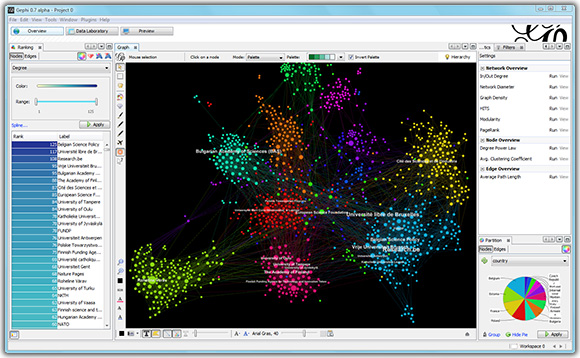
is a great open source graph visualization tool. I had encountered problems using it
on Windows 8.1 64-bit OS. I had Java 8 64-bit JDK installed on my machine. I read
some post mentioning that we should use the gelphi64.exe on Windows 8 64-bit OS and use the 64-bit version of the JDK. After installation (which went smoothly), the splash screen would appear a while, and then disappear and it stops working.
I was puzzled and tried to install the 32-bit version of JDK 8 on the PC. You could change the default JVM used by going into the etc sub directory in the gephi folder and changing the gephi.conf. Again it did not work.
Finally, I tried to also install the 64-bit version of latest JDK 7, and changed the gephi.conf to point to it. An this time it worked like a Charm Bar .. ooops, pardon the pun.
My gephi.conf looks like this
# default location of JDK/JRE, can be overridden by using --jdkhome
#jdkhome="/path/to/jdk"
jdkhome="C:\Program Files\Java\jdk1.7.0_67"
Well, it seems worthwhile to follow the original advice on the other blogposts to stick to 64-bit all the way (+ must be JDK 7 -- it won't work on JDK 8, yet ...., circa August 2014).
Who Needs to Know How to Code
To Build Websites and Apps, People Flock to Coding Classes
http://online.wsj.com/news/articles/SB10001424052702304709904579411354120634252
Source: WSJ article in link
http://online.wsj.com/news/articles/SB10001424052702304709904579411354120634252
"I equate coding to reading and writing and basic literacy," says Adam Enbar, founder of New York's Flatiron School, which offers 12-week, $12,000 programs to turn novices into developers. "Not everyone needs to be Shakespeare, just as not everyone needs to be an amazing developer," he says. "But…we're entering a world where every job if not already, will be technical."
Programming languages vary in popularity and difficulty, and it takes hundreds of hours to become even a junior developer. But understanding what "code" is and knowing what's possible and what's not, when working with an IT team, is generally more important than being able to make apps yourself.
Programming languages vary in popularity and difficulty, and it takes hundreds of hours to become even a junior developer. But understanding what "code" is and knowing what's possible and what's not, when working with an IT team, is generally more important than being able to make apps yourself.
Source: WSJ article in link
2014-08-16
Fatal error: Maximum execution time of 30 seconds exceeded & timeout problems (PHP debugging)
The error message above in the title line indicates that you have some code that takes too long to run in your php file. There is a sanity check that keeps track of the time you spend on a page, and the timer times-out you will get the Maximum execution time exceeded message. The duration for this time-out value is set in the php.ini
maximum_execution_time = 30
You can reset this in your file to debug what is happening. Using
ini_set('max_execution_time', 300);
sets the maximum execution time to 300 seconds or 5 minutes.
You need to surround snippets of your code with some timestamp routines to figure out
which portion is taking up a long time.
$ts = microtime(true);
// code snippet to check timing of
var_dump(microtime(true) - $ts);
If you are doing MySQL database queries, you can turn to the slow queries log to see if there are any SQL queries that are too complex and take a while to return (for e.g., a join with several large tables would slow down you query because of the large result set.
To enable the slow query log, start mysqld with the --log-slow-queries[=file_name]
The slow query log can be used to find queries that take a long time to execute and are therefore candidates for optimization. However, examining a long slow query log can become a difficult task. To make this easier, you can process a slow query log file using the mysqldumpslow command to summarize the queries that appear in the log.
Diagnosing slow PHP execution with Xdebug and KCachegrind
Profiling a PHP application can explain how much time the server spent in each function, each file, and each code path. It can also show you how many times a function or method was called, which is useful for diagnosing programming errors involving pointless looping. Xdebug generates cachegrind-compatible files which can also be used to create easy-to-understand graphs using KCachegrind.
The log file created by Xdebug can be small or large depending on what the application is doing. Also, it’s not really reader friendly. You’ll want to use programs like KCachegrind or Webgrind to view them. KCachegrind is a profile data visualization tool for KDE, which needs a Unix environment to run, whereas Webgrind is a web-based tool.
http://kcachegrind.sourceforge.net/html/Home.html
https://github.com/jokkedk/webgrind
https://github.com/ceefour/wincachegrind
http://ceefour.github.io/wincachegrind/
WinCacheGrind is a viewer for cachegrind.out files generated by xdebug 2. WinCacheGrind is functionally similar to KCacheGrind, only it is much simpler and runs on Windows.
As we have done in a previous PHP debugging tip, we need to enable certain Xdebug options in the php.ini file. Specifically those related to profiling.
xdebug.profiler_enable = 1
xdebug.profiler_output_name = xdebug.out.%t
xdebug.profiler_output_dir = /tmp
xdebug.profiler_enable_trigger = 1
xdebug.profiler_enable is used to enable profiling in Xdebug (off by default). xdebug.profiler_output_name is the filename of the profiler log (the %t specifier appends a timestamp to the filename.
xdebug.profiler_output_dir stores the profiling output in the directory specified
Profiling degrades performance since the PHP engine.
xdebug.profiler_enable_trigger instructs Xdebug to perform profiling only when XDEBUG_PROFILE is passed as a GET or POST parameter.
Subscribe to:
Posts (Atom)
-
Entity Framework (EF) Documentation Entity Framework (EF) is an object-relational mapper that enables .NET developers to work with relat...
-
You need to add an attribute android:screenOrientation to the activity in the AndroidManifest file
-
A Service is an application component that can perform long-running operations in the background and does not provide a user interface. Anot...
